A careers page builder for teams without a developer
Add your logo and brand colour, post your jobs, and your careers page is live at yourcompany.jobspage.co. Applications go straight into a built-in applicant tracker. Free for your first job.
Setup takes about five minutes. No credit card.
Features
What's on your careers page
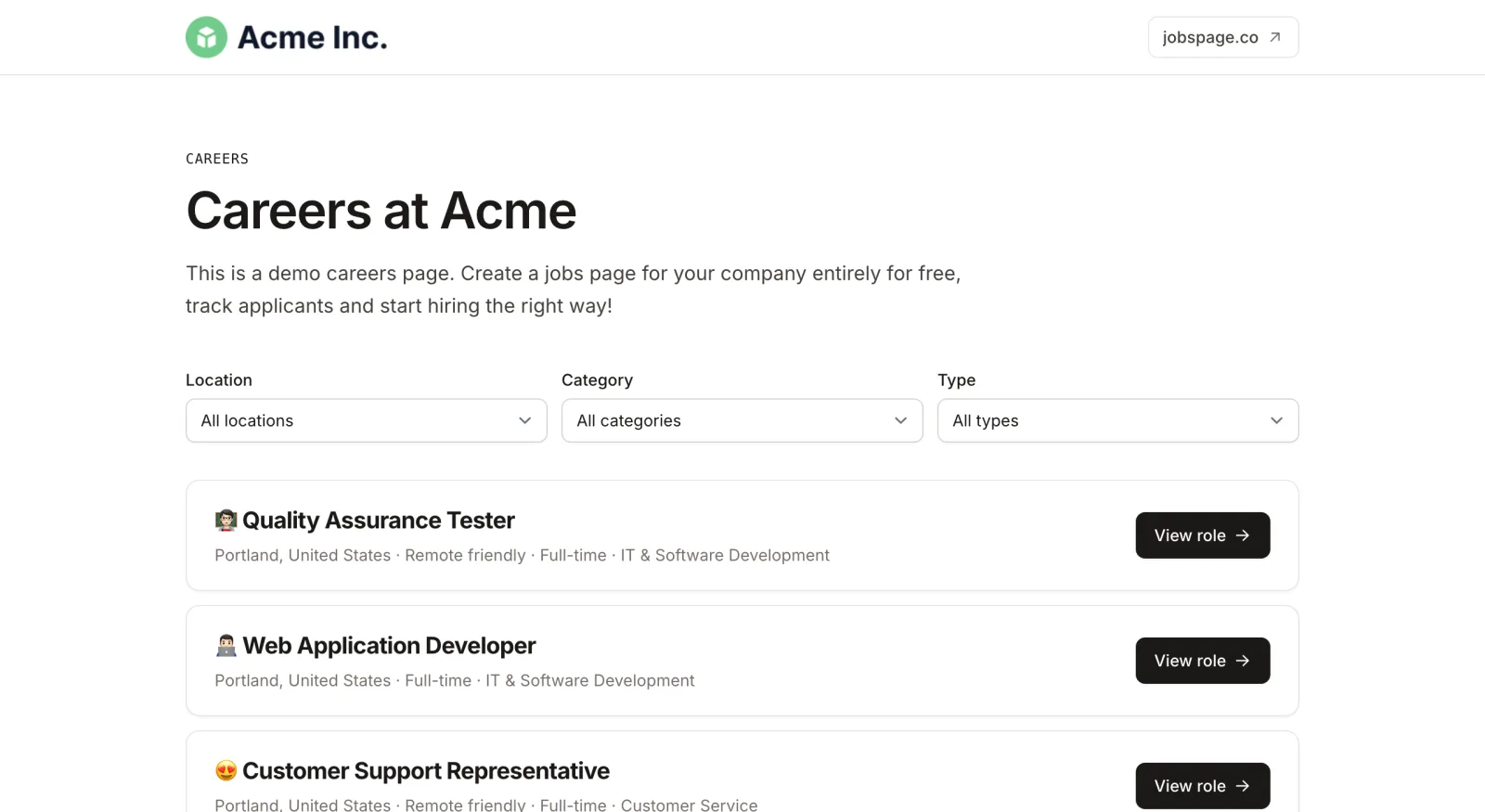
Your brand
Logo, company name, your own headline and intro, a link back to your website, and one brand colour for buttons and links.
Job list with filters
Candidates narrow the list by location (remote included), category and employment type, so a page with 15 roles still reads easily.
A page for every job
Each opening gets its own URL with the full description, the salary range if you add one, and an apply button. Share that link anywhere.
Your own application form
Add the fields you screen for, such as a portfolio link or notice period, and mark which ones are required.
Google for Jobs markup
Every job page carries the JobPosting structured data Google needs to show it in its jobs results.
Applicant tracking built in
Applications land in a pipeline with the resume and answers attached, and you rate candidates as you go. No inbox full of CVs.
How it works
Build it in three steps
- 01
Set up your page
Sign up, pick your address (yourcompany.jobspage.co), then add your logo, headline, intro and brand colour from the settings screen.
- 02
Post a job
Write the description or start from a job description template, choose the application fields, and publish.
- 03
Share it or embed it
Link the page from your website's menu, your LinkedIn company page and your email signature. On paid plans you can embed the job list in your own site instead.
Publishing
Two ways to publish it
Every plan, including Free
Hosted careers page
Your page lives at yourcompany.jobspage.co. Nothing to install and nothing to maintain. Add a "Careers" link to your site's menu and point it there.
Bootstrap plan and up
Embedded in your website
Copy one embed snippet from your settings and paste it into any page that accepts HTML, such as a custom HTML or embed block. The job list resizes to fit, and clicking a job opens its page and application form in a new tab.
<iframe src="https://yourcompany.jobspage.co/embed" width="100%" id="jobspage-yourcompany"></iframe>
<script>/* resizes the frame to fit your jobs */</script>
Plans
Free or paid
The careers page itself is the same on every plan. Paid plans add more open jobs, the embed, badge removal and your team. See pricing for the details.
| Careers page | Free | Paid plans |
|---|---|---|
| Hosted careers page | Yes | Yes |
| Logo, brand colour, headline and intro | Yes | Yes |
| Active job posts | 1 | 3, 10 or 20, by plan |
| Applicants | Unlimited | Unlimited |
| Embed the job list in your own site | No | Yes |
| Remove the "Powered by Jobspage" badge | No | Yes |
| Google Tag Manager on your page | No | Yes |
| Team members | 1 user | Unlimited |
| Price | $0 | From $19/month, billed yearly |
Limits
What it doesn't do
- No custom domain
- Your page lives at yourcompany.jobspage.co. To keep candidates on your own domain, embed the job list in your site (paid plans).
- No drag-and-drop editor
- There is one clean layout. You set the brand, the intro and the jobs, not the arrangement of the page.
- No job board multiposting
- Jobs can appear in Google for Jobs and each one has a Share on LinkedIn button, but Jobspage doesn't post to Indeed or other job boards for you.
FAQ
Careers page builder FAQ
What is a careers page builder?
A tool that creates the public page where candidates see your open jobs and apply, without a developer building it. Jobspage also includes the applicant tracking behind it, so applications arrive in the same place you posted the job.
Is it really free?
Yes. The free plan includes a hosted careers page with your logo and brand colour, 1 active job post and unlimited applicants, with no time limit and no credit card. Embedding the job list in your own site and removing the Jobspage badge need a paid plan, from $19/month billed yearly.
How do I add a careers page to my website?
Two options. On any plan, add a "Careers" link to your site's navigation that points to yourcompany.jobspage.co. On a paid plan, paste the embed snippet into a page on your site and the job list appears there, updating itself whenever you post or close a job.
Can I use my own domain, like careers.mycompany.com?
Not at the moment. The hosted page always lives at yourcompany.jobspage.co. If you want the jobs on your own domain, the embed puts the list on any page of your site.
What should a careers page include?
At minimum: who you are, your open roles with location and employment type, and an easy way to apply. The best ones add a line on why people like working there. For inspiration, see these career page examples.
Will my jobs show up on Google?
Each job page is published with the structured data Google for Jobs requires, so your jobs are eligible for Google's jobs results. When and whether Google lists them is up to Google.
Your careers page can be live today
Free for your first job, with unlimited applicants. Upgrade when you need more open roles or want the job list on your own site.
Build your careers page free